Passwords are familiar, but familiarity has not made them safe. People reuse them, attackers steal them, fake login pages collect them, and support teams spend time resetting them. Passkeys are designed to remove the reusable shared secret from the sign-in process. Instead of typing a password that both a person and a website effectively know, the user’s device proves that it holds the correct private cryptographic key while the service keeps only the matching public key.
For users, the experience can feel simple. A person may approve sign-in with the same fingerprint, face recognition, device PIN, or screen lock already used on a phone or computer. Behind that simple action is a cryptographic process that is much harder to phish than a password.
What is a passkey?
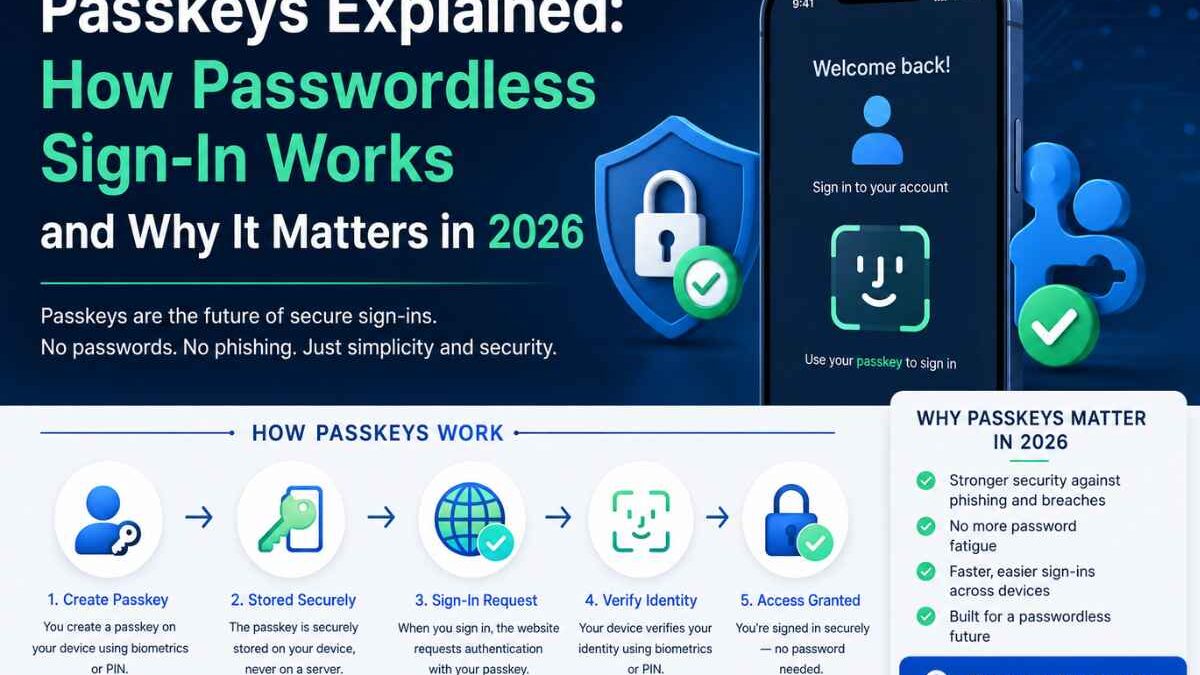
A passkey is a FIDO credential used for passwordless authentication. During registration, the user’s device creates a cryptographic key pair. The private key remains on the user’s device or inside a secure credential provider. The website receives the public key. When the user signs in later, the website sends a fresh challenge that can be signed only by the matching private key.
The private key is not typed, copied, or sent to the website. That design removes one of the biggest weaknesses of passwords: a reusable secret that can be stolen and replayed.
How passkey sign-in works
- Registration: The user chooses to create a passkey for an account.
- Local verification: The device confirms the user with a fingerprint, face scan, PIN, pattern, or security-key action.
- Key creation: A unique cryptographic key pair is created for that service.
- Public-key storage: The service stores the public key and links it to the account.
- Future sign-in: The service sends a challenge when the user attempts to log in.
- Private signing: After local verification, the device signs the challenge.
- Verification: The service validates the signature with the public key and grants access.
The user does not need to remember or transmit a password during this flow.
Why passkeys are resistant to phishing
Traditional phishing works because a password can be copied. If a person enters a valid password on a fake website, an attacker can often reuse it on the real site. Passkeys work differently because the credential is associated with the legitimate service. A fake domain cannot simply ask the user to reveal the private key and reuse it elsewhere.
This does not mean passkeys eliminate every security risk. Attackers can still target account recovery, already-unlocked devices, weak support procedures, session cookies, malware, or social engineering. However, passkeys remove a common reusable credential from the attack path.
Passkeys vs passwords
| Area | Password | Passkey |
|---|---|---|
| User remembers | A text secret | Usually nothing new |
| Service stores | Password hash | Public key |
| Phishing resistance | Weak | Strong by design |
| Reuse across sites | Common mistake | Credential is site-specific |
| Sign-in experience | Type or autofill password | Approve with device unlock |
| Recovery | Password reset | Passkey recovery or fallback |
Passkeys vs multi-factor authentication
Passkeys and multi-factor authentication are related but not identical. MFA usually asks for more than one factor, such as a password plus a code. A passkey can provide strong authentication without asking the user to type a password. In enterprise environments, security teams may combine passkeys with managed-device rules, conditional access, security keys, or additional verification for sensitive actions.
Not every MFA method provides the same protection. SMS codes and authenticator codes can improve security over password-only access, but they may still be captured by real-time phishing attacks. FIDO-based passkeys and security keys are designed to resist credential relay to a fraudulent site.
Synced passkeys vs device-bound passkeys
A synced passkey can be made available across a user’s trusted devices through a credential provider. This improves convenience because losing one device does not necessarily mean losing account access. A device-bound passkey remains on a particular device, such as a hardware security key. Device-bound credentials can be useful for administrators or other high-risk accounts where physical possession matters.
Organizations should choose the right model for each use case. Consumer services may prioritize convenience and recovery, while privileged enterprise accounts may justify stricter hardware-backed controls.
What happens if a user loses a phone?
Recovery is one of the most important parts of a passkey rollout. Businesses should define what happens when a user replaces a phone, loses a hardware key, changes platforms, or leaves an organization.
Recovery options may include additional trusted devices, backup security keys, account-recovery verification, administrator-assisted recovery for managed accounts, or carefully controlled fallback methods. The recovery path should not be dramatically weaker than normal authentication, because attackers often target the easiest route into an account.
Benefits for businesses
Passkeys can reduce more than phishing risk. They can also reduce password-reset tickets, remove password-complexity friction, shorten sign-in time, and improve account conversion when users abandon login because they cannot remember a credential.
However, implementation quality matters. A confusing passkey prompt, unreliable recovery flow, or inconsistent browser experience can frustrate users. Adoption should therefore be treated as both a security project and a user-experience project.
A practical passkey rollout plan
- Inventory accounts. Separate consumer users, employees, administrators, contractors, and service accounts.
- Start with high-risk groups. Privileged users and people frequently targeted by phishing may deserve early adoption.
- Keep safe fallback methods during migration. Do not remove every recovery option before testing real-world scenarios.
- Explain what users will see. Tell them the passkey is protected by their normal device unlock.
- Test major platforms. Include Windows, macOS, Android, iOS, popular browsers, managed devices, and security keys where relevant.
- Measure failed registrations and support requests. Authentication changes should be observed, not guessed.
- Review recovery security. Help-desk and recovery procedures are part of the authentication boundary.
Common mistakes to avoid
One mistake is treating passkeys as a magic switch that removes every identity risk. Another is deploying strong passkeys while leaving a weak password-reset or support process that lets an attacker bypass them. Organizations should also avoid forcing passkeys before testing device and browser compatibility for their audience.
A staged migration is usually easier to manage than a sudden cutover. Give users clear instructions, provide supported fallback options, and improve the experience based on actual sign-in data.
Should businesses adopt passkeys in 2026?
For many organizations, passkeys are worth evaluating now. Major platforms support them, the phishing-resistance benefits are meaningful, and the user experience can be easier than remembering passwords. The strongest case appears when security, usability, and reduced support costs all matter.
The goal should not be “remove passwords at any cost.” The goal is to create authentication that is difficult to steal, easy for legitimate users, and recoverable without opening an obvious back door.
Frequently asked questions
Are passkeys the same as biometrics?
No. A fingerprint or face scan may be used locally to unlock a passkey, but the biometric itself is not normally sent to the website. The service verifies a cryptographic signature.
Can passkeys be hacked?
No authentication method is invulnerable. Passkeys greatly reduce password theft and phishing risk, but businesses still need device security, recovery controls, session protection, and monitoring.
Do passkeys work without passwords?
Yes. A service can support passwordless passkey sign-in. Some services keep passwords temporarily as a fallback during migration.
Should MFA disappear after passkeys are deployed?
Not automatically. Security policy should consider account sensitivity, device trust, transaction risk, and recovery. High-risk operations may still justify additional verification.
Sources and further reading